A case manager spends 20 minutes hunting for a signed retainer before a client call. The file exists. It just lives in three different places. That is not a storage problem. It is a system problem.
Legal document management is the process of creating, organizing, securing, and retrieving legal files (contracts, pleadings, emails, court filings) through a structured system instead of scattered folders and email threads. A proper legal document management system (DMS) adds version control, audit trails, role-based access, and workflow automation on top of basic file storage.
According to the MyCase 2025 Legal Industry Report, 61% of law firms adopted document management software in 2024. Yet many case managers still work around broken habits that the software alone cannot fix. This guide covers what legal document management is, how it works, and what makes it effective in 2026.
Key Takeaways
- Legal document management is the full system behind how a law firm creates, stores, accesses, and retires its files. It is not just about where they are saved.
- A legal DMS does more than store files. It controls access, tracks versions, and maintains compliance logs automatically.
- Case managers are the daily operators of document systems. When the system is disorganized, they carry that burden most.
- IT support for law firms is the infrastructure layer that keeps the DMS secure, compliant, and running without interruption.
What Is Legal Document Management?
Legal document management is how a law firm controls the full lifecycle of every file, from the moment it is created to the day it is archived or deleted. It covers every document type a firm handles: signed retainers, demand letters, medical records, court filings, intake forms, and client correspondence.
Most case managers are already doing document management. The question is whether the system behind it is working for them or against them.
Without a structured approach, files end up split across email threads, desktop folders, shared drives, and paper binders. No one person knows where everything is. When a deadline hits, someone spends billable time searching instead of working.
How Does Legal Document Management Work?
Every document in a law firm follows a lifecycle. A DMS gives structure to each stage so nothing falls through the cracks between people, folders, or systems.
The Five Stages of the Document Lifecycle
1. Creation A document is drafted in Word, generated from a template, or auto-filled using intake data. In a well-run system, it is named correctly and linked to the right matter before anyone saves it.
2. Storage The file is stored under the correct matter, client name, or case ID in the DMS. Every team member finds it the same way, regardless of who created it or when.
3. Collaboration Multiple team members access, edit, and comment on the document. Version tracking records each change so two people cannot overwrite each other's work.
4. Review and Approval The document routes to the right attorney or partner for sign-off. Workflow automation handles the routing and sends reminders when a review is overdue.
5. Retention or Disposal The file is archived per the firm's retention schedule or securely deleted after the required period. Retention rules vary by document type and jurisdiction, so this stage requires a deliberate policy rather than a manual habit.
What Poor Document Management Costs Your Firm
Disorganized files quietly drain billable hours. The 2024 ABA Legal Technology Survey Report found that 73% of law firms now use cloud-based legal tools, with document and practice management software among the most commonly adopted technologies. Firms still relying on disconnected storage systems, email chains, and manual filing processes often create unnecessary operational delays and compliance risk.
The financial cost is one part. The risk exposure is another.
- Version errors send the wrong contract draft to opposing counsel
- Missing audit logs create compliance gaps during bar investigations or audits
- No retention schedule means client files are kept far longer than required, increasing liability
- Unsecured access puts sensitive medical records and settlement figures at risk
Firms that have not modernized their document workflows are not just less efficient. They are carrying avoidable operational and confidentiality risks.
Legal Document Management Tips That Work in 2026
These tips are aimed at case managers, the people who set up the system, enforce the habits, and deal with the fallout when something breaks.
1. Set a Firm-Wide File Naming Convention First
Even the best DMS breaks down without consistent naming. Files named "Final_FINAL_v3_USE THIS ONE" cannot be searched, sorted, or audited reliably.
A workable format: ClientLastName_MatterID_DocumentType_Date Example: Torres_PI-4421_Retainer_2026-03
The case manager owns this standard. Write it down, train every person who touches a file, and enforce it from day one.
Why it matters: New staff can navigate case files without a three-day orientation. That matters when you are onboarding someone through a pre-trained remote case manager program for law firms who needs to be productive in days, not weeks.
2. Assign Document Ownership at Every Stage
Without defined roles, two attorneys end up editing the same motion independently. You get duplicate files, version conflicts, and no one knows which copy is current.
Map permissions to job functions:
- Intake team uploads new client documents
- Paralegals edit and tag records
- Partners approve and archive final versions
Per the MyCase 2025 Legal Industry Report, defining user permissions is one of the most overlooked steps in legal document workflows. It is also one of the cheapest fixes.
3. Build and Use Templates for Repeat Document Types
Intake forms, retainer agreements, demand letters, and medical chronologies do not need to be drafted from scratch every time. Templates reduce prep time, cut errors, and keep documents consistent across every case.
Case managers are typically the ones who build and maintain these libraries. If your firm does not have a template for a document type that gets created more than once a week, that is a gap worth closing.
Why it matters: Attorneys spend less time fixing formatting errors in first drafts and more time on case strategy.
4. Turn On Version Control and Actually Use It
Version control tracks every saved change to a document. Without it, a contract edited after the last attorney review can go out with no one catching the difference.
Most platforms, including Clio, NetDocuments, and iManage, apply version tracking automatically once it is enabled. Set a firm rule: no document goes to an external party until it is version-stamped and approved.
5. Run a Document Audit Every Quarter
A quarterly audit keeps the system clean and catches problems before they grow.
What to check:
- Duplicates and outdated versions still sitting in active folders
- Files not linked to any matter
- Inconsistent naming across the team
- Access permissions for staff who have left the firm
Spellbook's legal document management guide recommends mapping all repositories and identifying duplicates as a starting point. Assign this as a standing quarterly task owned by the case manager.
6. Plan Your Retention Schedule Before You Need It
Most firms do not think about retention until they receive a records request or a bar inquiry. At that point, the question is whether the right files were kept, or whether they were kept at all.
A retention schedule defines how long each document type must be kept before archiving or deletion. Signed retainers, court filings, and correspondence each carry different requirements. Your state bar guidelines and IT support provider together define what those timelines look like.
How Legal Teams Use AI for Document Management
AI is now handling the time-consuming parts of document work that case managers used to do manually.
According to the MyCase 2025 Legal Industry Report, 39% of firms already use AI to summarize documents. Here is what AI is doing in legal document workflows right now:
- Document summarization: Tools like MyCase's 8am IQ assistant generate plain-language summaries of lengthy case files in seconds. Attorneys review rather than read every word.
- Auto-classification and tagging: AI reads a document and categorizes it by type, matter, or date without manual filing by the case manager.
- Contract review: AI scans for missing clauses, unusual terms, or compliance gaps in routine agreements before the attorney sees them.
- eDiscovery support: When a case involves large volumes of electronically stored information, AI surfaces relevant documents faster than manual review. The same report noted that 41% of firms named managing discovery as a top efficiency challenge in litigation.
- Document generation: AI drafts standard documents from intake data, reducing first-draft preparation time.
AI handles the repetitive parts well. Attorney review is still required for anything that carries legal weight.
IT Support for Law Firms: The Layer Behind the DMS
A document management system is software. Software depends on secure, well-maintained infrastructure to work correctly. This is where IT support for law firms becomes directly relevant to document management.
That means the security and uptime of the cloud environment matter as much as the software itself.
What IT support covers in a document management context:
- Integrations: Connecting the DMS to Microsoft 365, Outlook, and your case management platform so documents save and sync without manual uploads
- Access controls: Setting up multi-factor authentication and user permissions across your team, including remote staff
- Data backups: Ensuring that no case file is permanently lost due to a system failure or ransomware attack
- Compliance alignment: Maintaining audit logs and security protocols that satisfy ABA Model Rules 1.1 (competence) and 1.6 (confidentiality)
- Help desk support: Resolving system errors quickly so a document issue does not become a missed filing deadline
Firms evaluating their current setup may find it useful to review how law firms are solving their five most common operational challenges with remote staffing, including the document and communication bottlenecks that IT infrastructure alone does not resolve.
Case managers looking for a starting point on software can also read through the top legal document management tools broken down for remote case manager workflows, which covers what each platform does well in a distributed working setup.
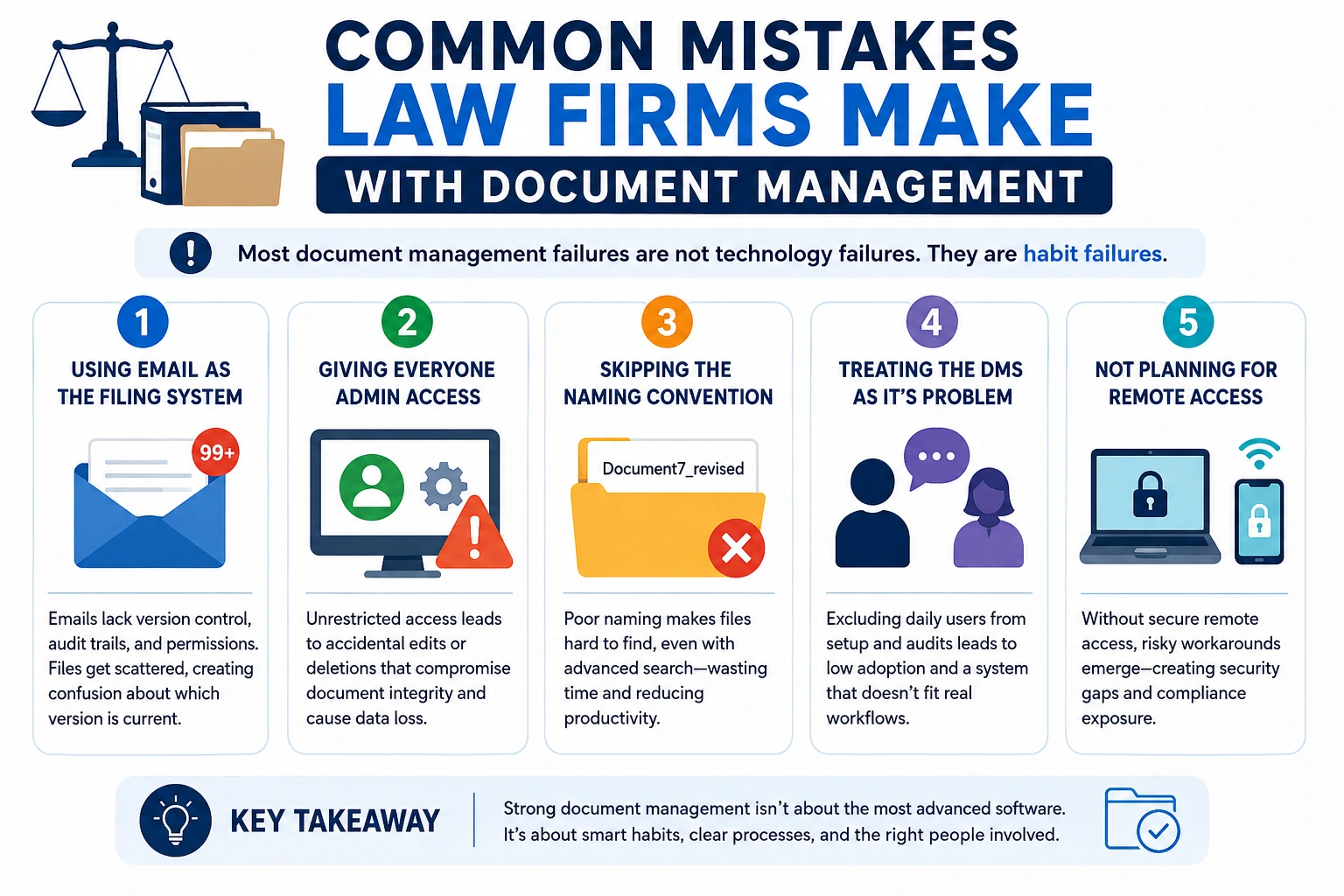
Common Mistakes Law Firms Make With Document Management
Most document management failures are not technology failures. They are habit failures.
1. Using email as the filing system.
Email was not built to function as a document management system. It has no version control, no audit trail, and no structured access permissions. When documents live across inboxes instead of a centralized DMS, firms create unnecessary confusion around which file is current, approved, or client-ready.
2. Giving everyone admin access.
When anyone can edit or delete anything, document integrity breaks down fast. One accidental deletion can cost hours of recovery work, or make a file permanently unrecoverable.
3. Skipping the naming convention.
Advanced search cannot help you find a file named "Document7_revised." Invest 30 minutes building a naming standard before touching any software settings.
4. Treating the DMS as IT's problem.
Case managers are the daily users. They need to be involved in setup decisions, onboarding, and quarterly audits. A system built without input from the people using it daily will not be adopted.
5. Not planning for remote access.
Staff now expect secure access to case files from anywhere. If your system cannot support that, workarounds appear: shared passwords, personal email attachments, and unsecured transfers that create more risk than the original problem.
.
What Remote Case Managers Actually Do With Document Systems
Remote case managers are the people inside the DMS every day. While attorneys focus on strategy and court appearances, the case manager handles the operational layer of document management from intake to file close.
Here is what that looks like in practice across a typical personal injury or immigration caseload.
Daily Document Tasks
A remote case manager working within a law firm's DMS handles the filing work that keeps cases moving:
- Uploading and naming incoming documents (medical records, police reports, insurance correspondence) per the firm's naming convention
- Linking every new file to the correct matter so nothing sits in an unassigned folder
- Flagging missing documents before deadlines, such as an unsigned authorization or a missing retainer
- Sending secure document requests to clients through the firm's client portal
Version and Approval Tracking
- Creating new document versions when attorneys return edited drafts
- Recording which version was sent to which party and on what date
- Tagging documents as draft, reviewed, approved, or final so status is visible to the whole team
Template and Workflow Management
- Maintaining the firm's template library and updating forms when court requirements change
- Running the document intake checklist at the start of every new case
- Routing documents for attorney review using DMS workflow tools rather than email chains
Quarterly Audits
- Pulling active matter lists and checking for incomplete file structures
- Identifying duplicate or misfiled documents before they create confusion later in a case
- Updating access permissions when staff changes occur
Frequently Asked Questions
What is a legal document management system? A legal DMS is software that helps law firms store, organize, retrieve, and track documents securely, including version history, access logs, and compliance tools built for legal workflows.
How is a legal DMS different from Google Drive or Dropbox? Standard cloud storage holds files. A legal DMS also tracks every change, controls who can access each file, routes documents for approval, and maintains compliance logs required by bar regulations.
Do small law firms need a document management system? Yes. Small firms face the same confidentiality and compliance obligations as large ones. A DMS reduces errors and saves time at any firm size, and many platforms offer affordable plans for solo practices.
How does IT support help with legal document management? IT support for law firms handles the infrastructure behind the DMS: cloud security, integrations with existing software, user permissions, data backups, and compliance with ABA Model Rules 1.1 and 1.6.
What is the first step to improving document management at my firm? Set a firm-wide file naming convention and assign clear document ownership roles before choosing any software. A well-designed system built on inconsistent habits will still fail.
Build the System, Then Hire Reliable Case Managers
A document management system gives your firm structure. A trained person running that system is what makes it work day to day. Both are necessary, and neither replaces the other.
The firms that get the most out of their DMS have someone who owns it: setting naming standards, running audits, maintaining templates, and catching gaps before they become problems. That ownership does not have to sit with the attorney.
The firms that treat document management as an operational system, not a filing task, spend less time recovering from errors and more time on the work that moves cases forward.

.webp)




.webp)


%20(1).webp)










.png)












%20(2)%20(2).avif)
.avif)